Saturday, July 9, 2016

[Design] The Brainstorming Process


On this first Design Log, we're going to cover how we started from our shared interest up to how we discovered our influences to fully flesh out the idea of the game.

Shared Interest

     Wondering how this project came to life? Well, it started with an dream (cliche', we know). And I guess a little bit of research too.


     For our First Capstone project, we wanted to create a third person shooter game, something that none of us really know how to create. Also, after a few months of studying and just playing around with the engine, we wanted to try and officially create a game using Unreal Engine 4. Although this may seem to be a rash choice, the group really considered it. If there's something that we always do, it is to make calculated risks.

Academic Research

     Since this is an academic project, we first did some research to decide our approach or framework for the game. As a group, we decided to focus on the Learning process of an individual. Eventually, we encountered one of the well-known concepts of teaching: Transfer of Learning.

    According to D. Perkins, Transfer of Learning is the ability to apply skills, knowledge, and/or attitudes that were initially learned from one situation to a different situation. Basically, the context of learning is different from actual application.

Looking for Inspiration

     With Transfer of Learning in mind, we started brainstorming about a game the involves a shooting mechanics that can be used in different situations. Thinking about it, there are alot of approaches for shooters. One cool approach is Portal's approach. Their bullets can create portal for you to reach one position to another. Most games use bullets for combat. But, the team needs to think of a situation where a gun or a bullet is used for multiple situations.

    Along with that, we also wanted to present a story for our game. We had an idea of having a Cyberpunk themed setting with a Norse Mythology influence would look cool. Also, revolving around a situation like Ragnarok would be awesome! We then decided to research further on Norse myth to see how we can further translate it into a Cyberpunk setting.
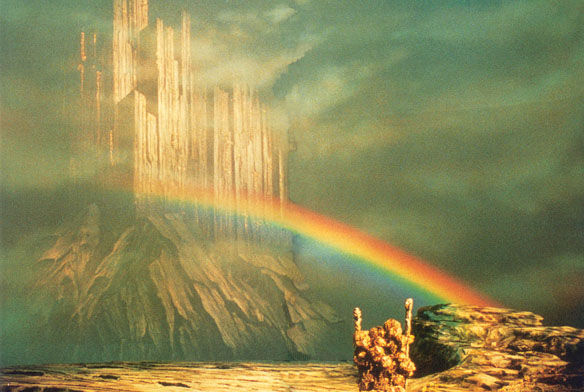
     In one of our research, we learned about a bridge called Bifrost.  It is the rainbow bridge that connects Asgard (the world of the Aesir gods) with Midgard (the world of Humans). And with this information, we had our EUREKA MOMENT and then the birth of Project: Einherjar followed.


(Source: http://norse-mythology.org/wp-content/uploads/2012/11/Bifrost.jpg)

Game Concept

     The group came up with a concept that we pitched to our adviser. We wanted to make an Action Role-Playing Third Person Shooter that contains some Platforming elements which would require the player to move around alot. In a way, we wanted to create a game that is fast paced and offers some level customization of skills.

    The game will have a Cyberpunk Setting that will revolve around an operation to eradicate Valhalla Corporation through Operation: Ragnarok. It will occur in Midgard, where its Government would like to preserve a society away from threat. Odin, the head scientist and CEO of Valhalla Corporation, is leading a specialized unit called Valkyrie to different areas that contain special materials that they can use to upgrade their machineries and increase the defenses against their foes. (More about the Story on another Design Log)

     As for the core Game Loop, the player will play as a Valkyrie with an objective to retrieve a special material that can be used to their advantage in the war. Ofcourse, there will be alot of enemies that would hinder her progress. Enemies and Platforming Puzzles will be the main obstacles of the game. Defeating enemies would reward into skill points that would allow the player to increase the Valkyrie's capabilities. 

    The main highlight of our pitch is the three main features of the game.
  1. Bifrost System - aside from the Valkyrie's combat bullet, she will have special bullet that can connect two objects and create a bridge between them. Areas that are too far can be accessed using this. Also, objects can be pulled towards each other. (This was later changed into a different system called 'Tether System')
  2. Body Parts System - enemies will have weakpoints. Some of them will have their weakpoints placed on hidden areas of their body. Utilizing the Bifrost System's Pulling Capabilities (Now, 'Tether System') will allow the Valkyrie to reveal the parts of the enemy and shoot at it.
  3. Einherjar System - throughout levels, dead people can be discovered. The Valkyrie has a special ability to scan a dead person and obtain its cognitive functions. In a way, the Valkyrie can see the person's last moments. As a reaction to extreme emotions, special abilities can be unlocked which can help change the tides of battles.


The group's process in preparation for our pitch is something that is very significant for us. Starting a new project always excite us as we this as another opportunity to push ourselves to our limits.

Up next will be more about the game's story and characters. Stay tuned!
   

Friday, July 8, 2016

[Engineering] Project Einherjar's Game Engine

     
     You guys may be wondering what Game Engine are we using in developing Project Einherjar?  Well GoaTo Interactive is proud to say that we are using the Unreal Engine 4 in developing our game.  We'll be using version 4.11.2 for the development.


We've already been developing systems for the game inside the engine itself.  It's pretty hard at first since we had to grasp the C++ interface of Unreal Engine and wire them in alongside Blueprints for more flexibility.  Yes, our game is built under C++ but we're also using Blueprints for our Game Designer to prototype faster gameplay elements.  Making systems for re-usability was tough since we had to learn different systems and implementations that Unreal has.  Like say for example even though Unreal Engine is a Component Based Design Engine it's quite different from Unity. 

Here's an example of what is the scripting environment of Unreal Engine 4


Whenever you create a script in UE4 you will be given an option on what type or parent class do you want your script to have.  These parent classes or type perform and act differently but they still have similar scripting environments.  Like say for example whenever you want to make "prefabs" like in Unity you may either want to choose an Actor rather than an Actor Component.  These two are different from each other because on the way they are instantiated.  Actors can be instantiated in a level in Unreal while on the other hand, Actor Components are like scripts in Unity wherein you could attach them to Actors to perform different tasks.  If you want to make characters or AI,  you may want to choose Pawn or Character as your parent class.  I know it starts to get complicated but in short Pawns are objects that can be possessed by a controller.  So basically if you want to create AIs you may want to use Pawn.  Character is a Pawn but is usually used by players and is controllable by players.  Here's something that will make your head dizzy,,, Pawns and Characters are Actors.  They basically inherit from Actor.  The way they differ from Actors is that they have these special components pre-built inside of them.  Some of these are movement and navigation controllers which might come in pretty handy for the programmers to make simple behaviors to complex ones. 

Here's a hierarchy of the objects in Unreal in their website.  You may want to check them out here when you're already used to develop in Unity.  Link Here. 


Oh before I continue,  whenever you make your project in UE4 with C++ you will need VS Community 2015 and the way UE4 compiles your code is pretty different compared to Unity.  Why?  Remember in Unity wherein whenever we save a script it will automatically compile right and apply changes to your game?  Well that's different from Unreal.  In Unreal you'll have to make a build out of your solution.  It's pretty much old C++ way of making games wherein you have to build everything and do a lot of things before it actually applies to your game.  Also, whenever you have to delete source code in your game you have to go to a lot of process.  It's not like Unity wherein you just have to delete the script but rather you have to remove it from the actual solution then delete it from the source folder then recompile the solution for it to be applied.  Yes, it requires a lot of process but you'll get used to it.


Every time you have new scripts added to your project, let's say your teammate just committed a new code in your repository, you'll have to generate new VS Projects since source control / git ignores any changes made in your .sln file so you'll have to regenerate these files again on your own.


Yeah, you'll get used to it guys.

Let's move one.  So if your familiar with Unity's scripting environment in C# you'll pretty much be familiar a bit with Unreal because they have similar structures when it comes to code.  So what do I mean by similar?  Well remember void Start(), void Update(), void OnTriggerEnter(Collider other) in Unity?  Yes, Unreal also has that in similar.  Unreal uses BeginPlay(), Tick(float deltaTime), and OnActorBeginOverlap().  It's pretty much the standard that game engines have wherein you have initializers/constructors and per frame executions. 

Here's a sample. 

Unity

C++

Blueprints


I won't be tackling about how to program in Unreal but I'll just give a little bit of insights on what it is inside Unreal Engine's scripting environment.  If I have time I may be posting some implementations that we have in Project Einherjar.

Unreal has static classes wherein you will directly have access to your Main Character, Camera, Game Controller, Game Modes, Game Instances, and many others.  You could read more about these frameworks here.  It's a deep concept but it might come in handy when you develop games.  Oh just a fun fact about Unreal... You might be always encountering castings in your scripts because their prefab system is totally independent from each other.  So like say you have a parent class called Fruit and you made a child class called Apple and Orange and you added different variables inside them.  Apple and Orange are not the same when you want to access specific variables that only exists individually in these child classes (I hope you're familiar with OOP) but they're similar in terms of parent classes where they are typeof Fruit. Lol... I'm trying to explain it as easy as I can in words.. sorry for that...


Moving on...

What made me interested in Unreal is about their nested prefab system that I guess Unity is probably already been working on in their upcoming versions of Unity.


Their prefab system is totally different from Unity's.  They have special editors for prefabs and it's hard at first to understand them.  For short, they're treating each and every component as individual objects so every time you add a component in your Blueprint Class these components are treated as objects wherein you could also use them to do specific actions.  If you look closer to the picture above you may notice that there's a separation between scene components and actor components.  Scene components are components that you could also add to your Blueprint Class. Oh wait.. Blueprint Classes are like prefabs in Unreal.  Sorry I forgot to mention that.    Also if you look closer to the encircled ones, they're called child actors.  This is the nested prefab that I was talking about.  Nested prefabs, on my understanding, is a special way that let's you create or add prefabs inside prefabs itself without breaking the up another prefab itself.  The orb and the sentry gun are different prefabs that we've added to this main prefab, the AI.  Hmmm how could I make this simple... Basically think of this one... Whenever you create prefabs in Unity and want to combine them in other prefabs,  you end up creating a new one right?  Like whenever you combine prefabs in Unity you ended up breaking the connections/links to the prefabs.  (Ok, I tried my best to simplify it.. Sorry...).  In Unreal, child actors are separate entities that can act independently.  This is why I found this system of Unreal interesting.

Also the last one I wanted to share to you guys is the UMG system that Unreal uses for their UI.  UMG is Unreal Motion Graphics which is one of the UI systems that they have.  Here in this system you'll have access to tools that let's you create UIs in Unreal.  If you're familiar with Visual Basic, you would probably find it familiar because the interface is really similar.


 The neat thing about UMG is that Unreal is treating it as a separate entity.  Basically in the UMG Editor you have your own scripting environment wherein you could bind functionalities to the UI.  It's really powerful and really is handy for programmers because it's totally a separate object and doesn't require any dependency.


You have your own SE here and it's similar to Blueprints as well.  The only difference is that it only contains Construct and Tick.  Of course you don't have any collision events in UIs right? lol...

Well that's pretty much all about it.. Developing in Unreal is really a wonderful experience and takes a lot of time to get used to.  I'm not saying Unreal is better than Unity but we only decided to use Unreal because we wanted something new and to really test out what we learned for the past couple of years as Game Development students in Benilde.  Unreal is really a powerful engine and as long as you supply great design and gameplay mechanics to your game,  you would probably have a successful game.

Thanks for your time guys! We will be posting more updates soon.... 

Thursday, July 7, 2016

[Sound] Audio Recording

Today we were able to record our new set of audios for Project Einherjar which will be used for the game.  Some of the voice recordings consists of the actual voice of some of our characters and the other are audio logs which will be present around the level.

We will be adding some samples of the voices soon.


Wednesday, July 6, 2016

[Art] Valkyrie 3D Model

3D Model of Project Einherjar's Main Character, Valkyrie.

About the Design:
TBA

Tools Used
1. Autodesk Maya 2016
2. ZBrush 4R7
3. Substance Painter
4. Adobe Photoshop


Artists
1. Alson Entuna - Character Modeler, Rigger, Sculptor, Skinner
2. Jed Pascua - Texture Artist, Armor Modeller (Headgear and Arm Armor)
3. Paul Aguilar - UV 


Screenshots:

Maya


ZBrush


Rig


Tuesday, July 5, 2016

About the Developers


     GoaTo Interactive is a 5-person team of Game Design and Development students from De La Salle-College of Saint Benilde. The team has been doing video game projects for almost three years. For this time, a Capstone 1 entry would be done by the same people of the team.

Project Einjerhar is being developed by GoaTo Interactive.

GoaTo Interactive Members

Paul Aguilar - Project Lead, Lead Game Designer, Artist, Co-Producer
Alex Arcega - Environment Artist
Alson Entuna - Lead Programmer, Character Artist, Co-Producer
Josh Ignacio - Programmer, Game Designer
Jed Pascua - Environment Artist, Character Texture Artist